



Shop Goumikids on Instagram: 2026 Step-by-Step Guide

Tap the shopping bag icon on a Goumikids Instagram post, tap the product tag, and you land on that item's page in seconds — no digging through the grid, no typing the product name into a search bar later. That's the whole trick to shop Goumikids on Instagram in 2026: the app already knows which mitts, boots, or gown is in the photo. You just have to know where to tap.
- Tap a tagged Goumikids post on Instagram to open the exact product page in 2026.
- Checkout usually redirects to goumikids.com since Goumikids runs on Shopify, not Instagram's native checkout.
- The Shop tab on the Goumikids Instagram profile groups mitts, boots, gowns, footies, and rompers by category.
- A missing Shop tab or an unclickable tag almost always means an outdated Instagram app, not a pulled listing.
Why this matters
Parents scroll Instagram half-asleep with a baby on one arm — nobody wants to screenshot a gown, open a browser, and search the color name from memory. Instagram's shopping tags close that gap by linking the exact photo to the exact product page, and for a brand like Goumikids that ships dozens of colorways across gowns, footies, mitts, and boots, that link matters more than it does for a single-SKU brand. Skip the workflow and you end up guessing which shade of storm gray or midnight you actually saw in the Reel.
Before you start
- Update the Instagram app first. Shopping tags and the Shop tab render inconsistently on older app versions — this is the single most common reason a tap does nothing.
- Have a payment method saved, either in Meta Pay or on the goumikids.com checkout, since most independent Shopify stores route the final purchase to their own site rather than Instagram's in-app checkout.
- Follow the account if you want tagged posts to show up in your main feed instead of only appearing when you visit the profile directly.
The gotcha nobody warns you about: tapping a product tag on an independent brand's post often opens a mobile browser instead of a slick in-app checkout screen. That's not a bug — Shopify-based brands like Goumikids typically finish the sale on their own site, where sizing charts, color swatches, and the full catalog actually live.
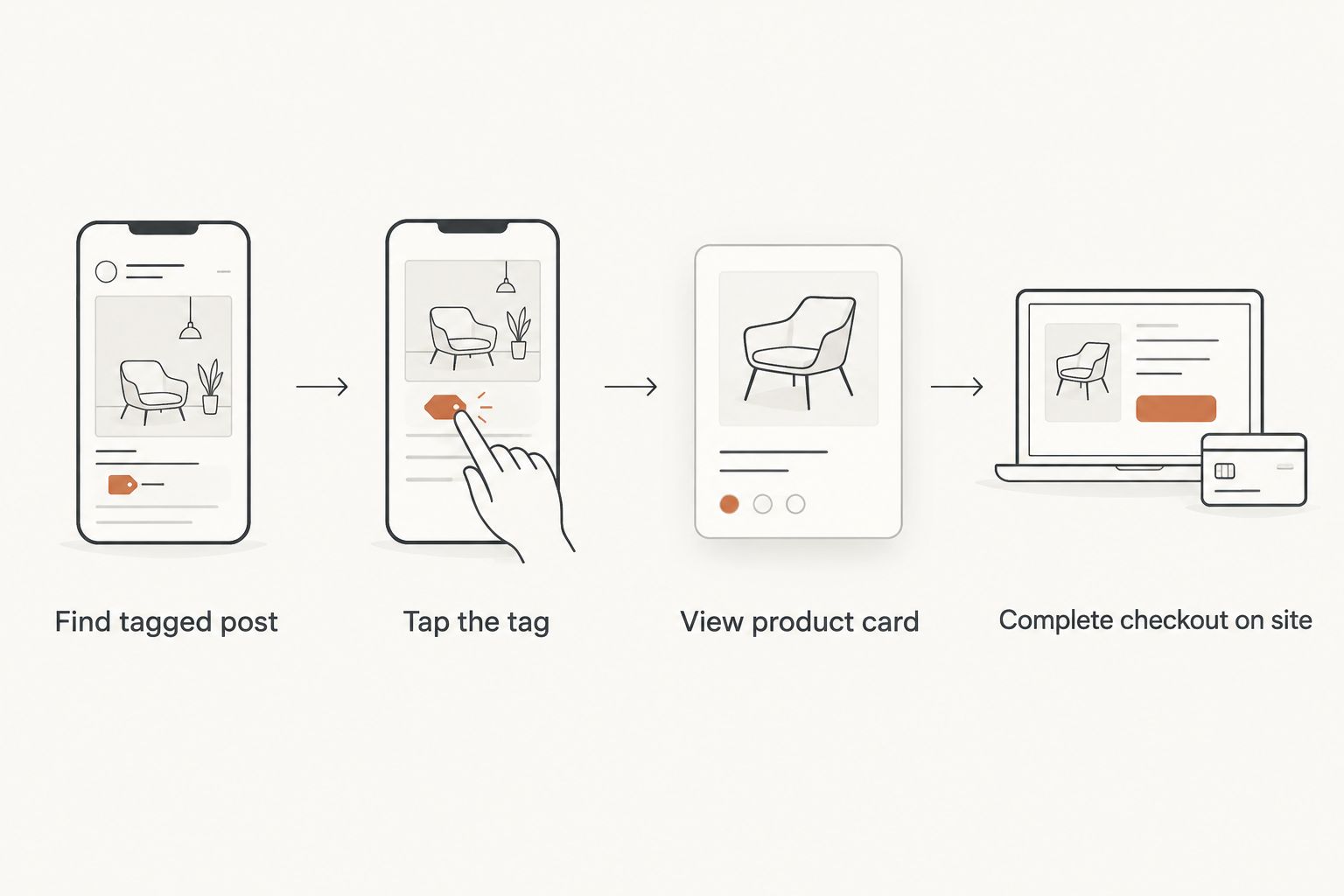
Find and tap a tagged product
- Open the Instagram app and go to the Goumikids profile, either by searching the name or tapping through from a post a friend shared.
- Look for the small shopping bag icon in the corner of a photo or the first frame of a Reel — that icon means one or more products are tagged.
- Tap the photo once. Product tags pop up as small white dots or labels over the item — a mitt, a boot, a gown.
- Tap the label itself, not just the dot, to open the product detail card inside Instagram.
Expected result: a card slides up showing the product name, price, and a View Shop or View on Website button. If nothing pops up after tapping the photo, the post likely isn't tagged, or the app needs an update.
Browse the full Shop tab
- From the Goumikids profile, tap Shop in the row of tabs under the bio (it sits alongside Posts, Reels, and Tagged).
- Scroll the grid — Instagram organizes it visually rather than by category, so a storm gray convertible gown might sit next to a pair of stay-on boots.
- Tap any tile to open its product card, then tap View Shop to see full details, sizes, and other available colors.
- Use this tab when you're browsing broadly instead of chasing one specific post you remember seeing.
Expected result: you can scroll the entire tagged catalog without hunting through months of old posts.
Complete checkout
- On the product card, tap View on Website (wording varies slightly by app version).
- This opens goumikids.com in an in-app browser or your default browser — same Shopify checkout the main site uses.
- Confirm size and color on the product page itself, since Instagram's card sometimes shows only the color visible in that specific photo.
- Complete payment on the site as you normally would.
Expected result: an order confirmation from goumikids.com, not from Instagram — that's normal for this setup, not a failure.
Shop from Stories and Reels instead
The same tagging system works inside Stories and Reels, and it's worth learning as a second habit since a lot of new-arrival colorways show up there first in 2026 before they hit the main feed.
- Watch a Story or Reel until a product sticker appears, usually a small tag with the item name overlaid near the bottom of the screen.
- Tap the sticker directly — unlike feed posts, there's no need to tap the video first to reveal it.
- The same product card opens, with the same View on Website path to checkout.
This matters because Stories and Reels disappear or move down the queue fast; if you see a pair of boots you like mid-scroll, tap immediately rather than planning to "come back to it later."
“If the shopping bag icon doesn't show up on a post, update the Instagram app before you try anything else.”
Troubleshooting
- Shop tab is missing from the profile entirely. Instagram's shopping features roll out by account and region, so this can be a temporary gap rather than something Goumikids controls directly. Try the tagged posts route instead.
- Tapping the photo does nothing. Either the post isn't tagged or the app version is behind — update the app, then retry.
- The tag opens a browser instead of an in-app checkout. Expected behavior for Shopify-based stores in 2026; the sale still completes normally on goumikids.com.
- A color or size shows unavailable on the tagged product card. The card sometimes lags behind the live site. Check the product page directly for other sizes or similar colorways, like the storm gray convertible gown or stay-on boots in Boulder Birch.
- You can't find a specific item you saw days ago. Scroll the Shop tab rather than the feed — Instagram keeps tagged products there even after the original post scrolls out of view.
Customize your workflow
Once tapping tags feels automatic, layer on a second habit: check the goumikids.com site directly for anything not yet tagged on Instagram, since new drops sometimes post to the site a little ahead of the full Instagram catalog. If you're shopping for a specific need — sleep gowns, gift sets, preemie sizing — the site's category pages go deeper than any single Instagram post ever will.
FAQ
Can you buy directly inside the Instagram app from Goumikids?
Tapping a tagged product opens a card inside Instagram, but checkout for Goumikids typically redirects to goumikids.com to complete payment through the brand's own Shopify checkout in 2026.
Why doesn't the Goumikids Instagram profile show a Shop tab?
Instagram's shopping features roll out by account and region, so the tab can be temporarily unavailable even when tagged posts still work. Updating the app first usually resolves display issues.
How do I find a specific color I saw in a Goumikids Reel?
Tap the product sticker directly on the Reel while it's playing, or check the Shop tab on the profile, which keeps tagged items available after the post scrolls out of the feed.
Is shopping Goumikids on Instagram the same price as the website?
Tapping a tagged product sends you to the same goumikids.com product page and checkout used on the main site, so pricing and options match what's currently listed there.
What if the product tag isn't clickable?
An outdated Instagram app is the most common cause. Update the app, reopen the post, and tap the photo again to reveal the tag.
Does Goumikids post new colorways on Instagram before the website?
New arrivals sometimes appear in Stories or Reels first, tagged with a product sticker that links straight to the item once it's live on the site.
Can I see sizing information from the Instagram product card?
The in-app card shows limited detail. Tap View on Website to see the full size chart and available colors on the actual product page.
Do I need to follow Goumikids to shop tagged posts?
No — you can tap tags on any public post by visiting the profile directly, though following the account puts tagged posts into your regular feed automatically.
One last thing
The Shop tab is the part most people skip because tapping one tagged post feels like enough — but it's the only view that shows the full tagged catalog at once, gowns and boots and mitts side by side, instead of whatever happened to be in the last Reel you watched. Start there in 2026 if you're comparison-shopping colorways rather than chasing one specific post.